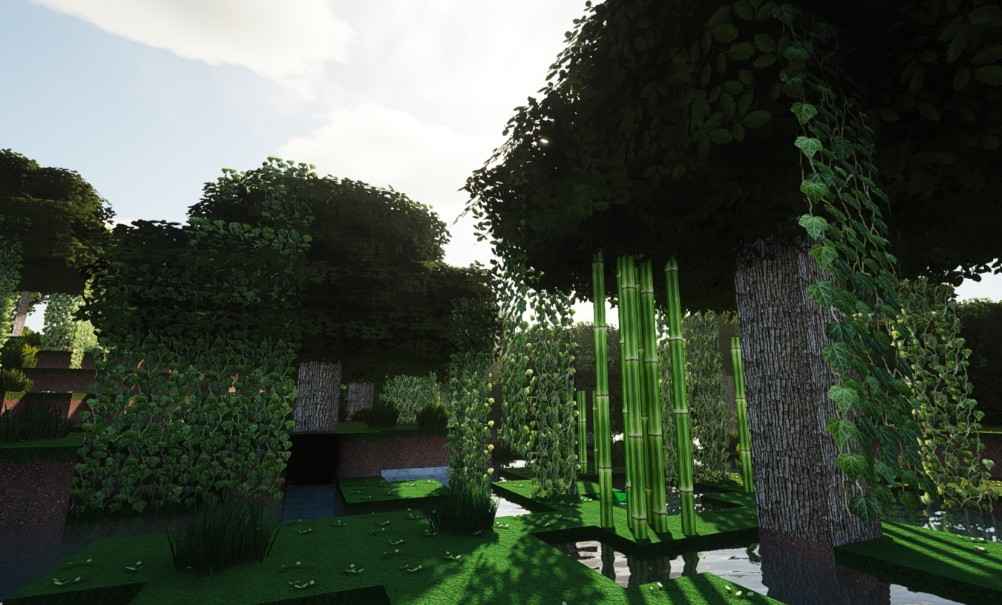
From its iconic blocky graphics that millions adore, to more realistic Minecraft texture packs for players looking for a more immersive experience. These packs do not change any historic mechanics of Minecraft, but replace default textures with high-resolution, realistic looking graphics bringing your Minecraft world as close to reality as possible.
In this accompanying guide, we discuss exactly what a realistic Minecraft texture pack is and highlight some of the best packs available before covering installation methods (both with or without Minecraft Forge), some tips on optimising performance, and then finally how to choose the right one for your system.
🔹 What is a Realistic Minecraft Resource Pack?
A realistic Minecraft texture pack is a collection of files that change the look of blocks, items, mobs and environments in-game. Realistic pack differ from standard textures as they have high-resolution graphics for a lifelike effect.
Main Features of Realistic Texture Packs
- High-definition resolutions (64×64, 128×128, 256×256)
- Highly detailed natural elements, include things like grass and water and stone
- Better lighting and shadows with use of shaders
- Better visuals for tools, mobs, and weapons
A realistic Minecraft texture pack offers a substantial boost to immersion, making everything from landscapes and cities to the builds you make with blocks appear more lifelike.
🌟 Best Realistic Minecraft Texture Packs
In this article we detail some of the best realistic Minecraft texture packs that players have been using:
📊 Texture Pack Comparison Table
| Texture Pack | Resolution | Features | Compatible Minecraft Version |
|---|---|---|---|
| LB Photo Realism | 128×128 | Ultra-realistic blocks, water, and sky | 1.16+ |
| PureBDCraft (Realistic Edition) | 128×128 | Comic-realistic textures with detailed items | 1.17+ |
| Realistico | 256×256 | Photorealistic textures, smooth terrain | 1.19+ |
| Modern HD Pack | 64×64 | Realistic urban environments and buildings | 1.18+ |
| Misa’s Realistic Pack | 128×128 | High-quality natural textures, enhanced mobs | 1.16+ |
They all deliver realistic look, but resolution and style depend on your choice and hardware capabilities.
⚙️ How to Install Realistic Minecraft Texture Pack
Installing realistic texture packs is actually easy:
Step-by-Step Installation
- Make sure to Download Texture Pack that is compatible with Minecraft version.
- Locate the Resource Packs Folder:
- Windows:
C:\Users\[Username]\AppData\Roaming\. minecraft\resourcepacks - Mac:
~/Library/Application Support/minecraft/resourcepacks
- Windows:
- Copy the ZIP File: Paste your downloaded texture pack zip file here.
- Use in Minecraft: Open Minecraft → Options → Resource Packs… → Select pack → Done!
🔧 Optional Enhancements
- OPTIONAL:DON’T FORGET to use Shader packs like SEUS, BSL or CONTINUUM for realistic light and shadow.
🌄 Best Settings For Realistic Gameplay
Do these to get the most realistic texture pack experience:
- Get high pack (8×8, 16×16, 32×32) different packs with detail information structured areas of textures.
- Combine with the shader packs for realistic light, shadow or water reflection
- Use: smooth lighting ON, render distance 12–16 chunks and graphics Fancy
- Install OptiFine (for Preformance hit/Enable HD Textures/shaders)
🎮 Pros and Cons
📊 Comparison Table
| Pros | Cons |
|---|---|
| Immersive, lifelike visuals | High-resolution packs may reduce FPS |
| Better for building and exploration | Larger files require more memory |
| Makes the screen shots and video capture to be beautiful | Shaders may be needed for the best effects |
| Compatible with most Minecraft versions | Can changes the appearance of mobs which can change their patterns |
🌿 How to Choose the Right Realistic Pack
Key Factors to Consider
- Check Compatibility — Ensure the pack is compatible with your version of Minecraft
- Resolution – Higher resolution looks great but need better hardware.
- Look at Reviews — User feedback is key in identifying bugs or performance issues.
- Testing: Test on a demo world to check if it runs smoothly
🔹 Recommended Combinations
💡 Best Pairings Table
| Combination | Benefit |
|---|---|
| QHD pack + SEUS shaders | Cinematic builds territory |
| Modern HD Pack + OptiFine | Perfect for urban city builds |
| Misa’s Realistic Pack + BSL shaders | Best Minecraft for photoreal landscapes |
Packs combined with shader options enhance immersion, without compromising on FPS.
📌 Conclusion
A realistic Minecraft texture pack can rework your whole world, from stunning landscapes to jaw-dropping cities and interiors. Play is better in immersive forests (or variegated foliage),42:01 — more realistic mountains,43:00 — urban worlds,44:49 — particle packs.
To get the best effect, you should combine your selected realistic pack with shaders, high-res settings, and OptiFine. With the correct combination, your Minecraft realm can be lively, interesting, and near authentic.
About the Author